Certificates and ingress
Your own CA, cert-manager, and HTTPS for every web interface.
Why Certificates, on the tour
On this page 6 sections
Every web interface and log connection gets a certificate from a private CA. Name constraints limit the CA to internal names and addresses, so even a stolen CA key could not impersonate a public website.
1. Make the CA#
On the laptop, in a folder of its own outside the repository. The key is encrypted with a passphrase from the start: pkey -aes256 asks for it twice, and every later use of the key asks again. Keep the passphrase in your password manager, and a copy of ca.key there too. This copy never goes into Git; the cluster gets its own in step 2.
OPENSSL=/opt/homebrew/opt/openssl@3/bin/openssl
mkdir -p ~/homelab-ca && cd ~/homelab-ca
$OPENSSL ecparam -name prime256v1 -genkey -noout | $OPENSSL pkey -aes256 -out ca.key
chmod 600 ca.key
$OPENSSL req -x509 -new -key ca.key -sha256 -days 3650 -out ca.crt \
  -subj "/CN=Homelab Root CA/O=Homelab" \
  -addext "basicConstraints=critical,CA:TRUE,pathlen:0" \
  -addext "keyUsage=critical,keyCertSign,cRLSign" \
  -addext "nameConstraints=critical,permitted;DNS:internal,permitted;DNS:svc,permitted;DNS:cluster.local,permitted;IP:192.168.0.0/255.255.0.0"
Check
$OPENSSL x509 -in ca.crt -noout -subject -enddate -ext nameConstraintsThe subject, an end date ten years ahead, and the four permitted names and addresses.
2. The CA for cert-manager, encrypted#
cert-manager signs certificates with the CA, so the cluster needs the key, without a passphrase, as a SOPS-encrypted secret in the repository. Unlock it on its own first, so openssl has the terminal to itself when it asks for the passphrase. The unlocked key lives only in a shell variable, never on disk, and is gone after unset.
KEY=$(openssl pkey -in ~/homelab-ca/ca.key)cd ~/homelab
kubectl create secret tls homelab-ca -n cert-manager \
--cert=$HOME/homelab-ca/ca.crt --key=<(printf '%s\n' "$KEY") \
--dry-run=client -o yaml > infrastructure/configs/homelab-ca.sops.yaml
unset KEY
sops --encrypt --in-place infrastructure/configs/homelab-ca.sops.yaml
cp ~/homelab-ca/ca.crt infrastructure/configs/homelab-ca.crtCheck
grep -cE '^ +tls\.(crt|key): ENC\[' infrastructure/configs/homelab-ca.sops.yaml2: the certificate and the key are both encrypted. Check this before every commit of a .sops.yaml file. (A plain grep -c 'ENC[' finds 3: SOPS's own checksum at the end is encrypted too.)
3. Trust the CA on your laptop#
If you made a CA before, the keychain may still trust the old one, under the same name. Compare the fingerprints, and remove any that is not the new one:
security find-certificate -a -c "Homelab Root CA" -Z /Library/Keychains/System.keychain | grep SHA-256
$OPENSSL x509 -in ~/homelab-ca/ca.crt -noout -fingerprint -sha256
sudo security delete-certificate -Z <old SHA-256> /Library/Keychains/System.keychain # only for an old onesudo security add-trusted-cert -d -r trustRoot -k /Library/Keychains/System.keychain ~/homelab-ca/ca.crtFirefox and its forks, such as LibreWolf, do not use the macOS keychain: they keep their own list of trusted CAs. Import ca.crt there too, under Settings, Privacy & Security, Certificates, View Certificates, Authorities, Import, and tick "Trust this CA to identify websites".
4. cert-manager, the Gateway API and Traefik#
apiVersion: v1
kind: Namespace
metadata:
  name: cert-manager
---
apiVersion: source.toolkit.fluxcd.io/v1
kind: HelmRepository
metadata:
  name: jetstack
  namespace: cert-manager
spec:
  interval: 24h
  url: https://charts.jetstack.io
---
apiVersion: helm.toolkit.fluxcd.io/v2
kind: HelmRelease
metadata:
  name: cert-manager
  namespace: cert-manager
spec:
  interval: 30m
  chart:
    spec:
      chart: cert-manager
      version: "v1.21.2"
      sourceRef:
        kind: HelmRepository
        name: jetstack
  values:
    crds:
      enabled: true
      keep: true
The Gateway API's resource definitions come from their release, unchanged:
curl -sL https://github.com/kubernetes-sigs/gateway-api/releases/download/v1.6.3/standard-install.yaml \
-o ~/homelab/infrastructure/controllers/gateway-api-crds.yamlShow the whole file, 48 lines
apiVersion: v1
kind: Namespace
metadata:
  name: traefik
---
apiVersion: source.toolkit.fluxcd.io/v1
kind: HelmRepository
metadata:
  name: traefik
  namespace: traefik
spec:
  interval: 24h
  url: https://traefik.github.io/charts
---
apiVersion: helm.toolkit.fluxcd.io/v2
kind: HelmRelease
metadata:
  name: traefik
  namespace: traefik
spec:
  interval: 30m
  chart:
    spec:
      chart: traefik
      version: "41.7.1"
      sourceRef:
        kind: HelmRepository
        name: traefik
  values:
    deployment:
      replicas: 2
    providers:
      kubernetesGateway:
        enabled: true
      kubernetesIngress:
        enabled: false
    gatewayClass:
      enabled: true
    gateway:
      enabled: false
    ingressRoute:
      dashboard:
        enabled: false
    service:
      annotations:
        metallb.io/loadBalancerIPs: 192.168.5.201
      spec:
externalTrafficPolicy: Local- Traefik serves the Gateway API only, on the fixed address
192.168.5.201, where unbound sends every*.apps.internalname.
apiVersion: kustomize.config.k8s.io/v1beta1
kind: Kustomization
resources:
  - metallb.yaml
  - cert-manager.yaml
  - gateway-api-crds.yaml
  - traefik.yaml
5. The issuer and the gateway#
apiVersion: cert-manager.io/v1
kind: ClusterIssuer
metadata:
  name: homelab-ca
spec:
  ca:
secretName: homelab-caapiVersion: cert-manager.io/v1
kind: Certificate
metadata:
name: wildcard-apps-internal
namespace: traefik
spec:
secretName: wildcard-apps-internal-tls
dnsNames:
- "*.apps.internal"
issuerRef:
kind: ClusterIssuer
name: homelab-ca
---
apiVersion: gateway.networking.k8s.io/v1
kind: Gateway
metadata:
name: homelab
namespace: traefik
spec:
gatewayClassName: traefik
listeners:
- name: https
protocol: HTTPS
port: 8443
hostname: "*.apps.internal"
tls:
mode: Terminate
certificateRefs:
- kind: Secret
name: wildcard-apps-internal-tls
allowedRoutes:
namespaces:
from: All- One wildcard certificate for
*.apps.internal: a new web app only needs a route, no certificate of its own.
apiVersion: kustomize.config.k8s.io/v1beta1
kind: Kustomization
resources:
  - metallb-pool.yaml
  - homelab-ca.sops.yaml
  - cluster-issuer.yaml
- gateway.yamlcd ~/homelab && git add infrastructure && git commit -m "cert-manager, the homelab CA, Traefik and the gateway" && git push
flux reconcile kustomization flux-system --with-source
flux get kustomizations --watchCheck
kubectl create deployment whoami --image=traefik/whoami
kubectl rollout status deployment whoami
kubectl expose deployment whoami --port=80
kubectl apply -f - <<'EOF'
apiVersion: gateway.networking.k8s.io/v1
kind: HTTPRoute
metadata:
  name: whoami
spec:
  parentRefs: [{ name: homelab, namespace: traefik }]
  hostnames: ["whoami.apps.internal"]
  rules: [{ backendRefs: [{ name: whoami, port: 80 }] }]
EOF
sleep 5
curl -sS -m 5 https://whoami.apps.internal | head -3
kubectl delete httproute,svc,deployment whoami
A reply from whoami over HTTPS, with no certificate warning: the wildcard certificate is signed by your CA, which the laptop trusts.
6. A certificate for the UniFi controller#
Certificates for things outside the cluster live in an application layer of their own. UniFi OS Server cannot fetch its certificate, so this one is exported once a year and uploaded.
apiVersion: kustomize.toolkit.fluxcd.io/v1
kind: Kustomization
metadata:
  name: apps
  namespace: flux-system
spec:
  dependsOn:
    - name: infra-configs
  interval: 10m
  path: ./apps
  prune: true
  decryption:
    provider: sops
    secretRef:
      name: sops-age
  sourceRef:
    kind: GitRepository
name: flux-systemapiVersion: kustomize.config.k8s.io/v1beta1
kind: Kustomization
resources:
- external-certsapiVersion: v1
kind: Namespace
metadata:
name: external-certsapiVersion: kustomize.config.k8s.io/v1beta1
kind: Kustomization
resources:
- namespace.yaml
- unifi.yaml# Certificate for UniFi OS Server (unifi.internal:11443).
# Not installed automatically: export it and upload it in UniFi once a year.
apiVersion: cert-manager.io/v1
kind: Certificate
metadata:
name: unifi-internal
namespace: external-certs
spec:
secretName: unifi-internal-tls
commonName: unifi.internal
dnsNames:
- unifi.internal
ipAddresses:
- 192.168.5.60
duration: 9528h # 397 days, the maximum Apple devices accept
renewBefore: 720h # 30 days
privateKey:
algorithm: RSA
size: 2048
usages:
- server auth
- digital signature
- key encipherment
issuerRef:
kind: ClusterIssuer
name: homelab-cacd ~/homelab && git add clusters apps && git commit -m "Apps layer: certificate for the UniFi controller" && git push
flux reconcile kustomization flux-system --with-source
kubectl -n external-certs get secret unifi-internal-tls -o jsonpath='{.data.tls\.crt}' | base64 -d > ~/Desktop/unifi.crt
kubectl -n external-certs get secret unifi-internal-tls -o jsonpath='{.data.tls\.key}' | base64 -d > ~/Desktop/unifi.keyUpload both in UniFi OS Server: Settings, Control Plane, Console, Certificates, Add New, tab Upload. Then delete them from the desktop: the key is the controller's private key.
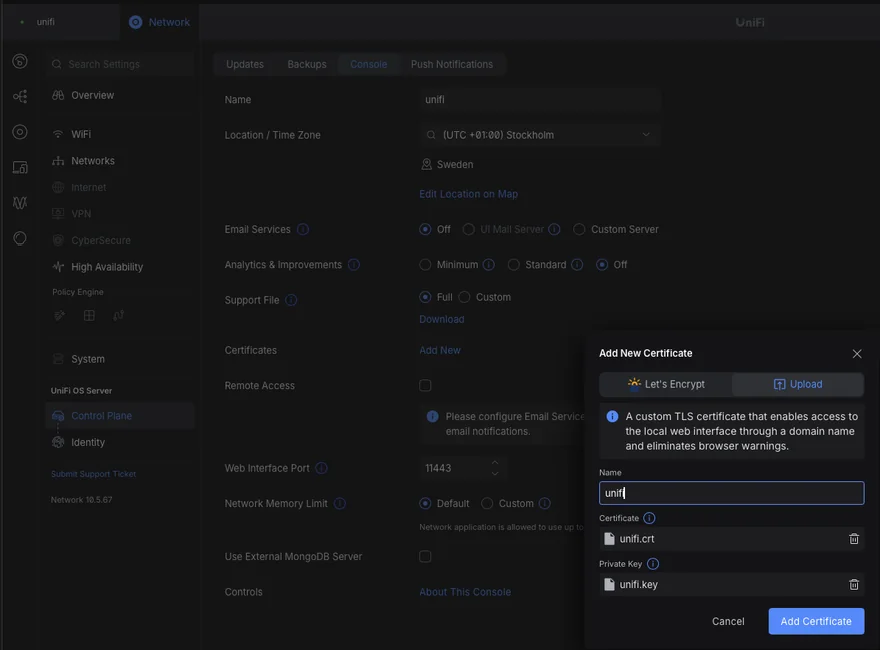
rm ~/Desktop/unifi.crt ~/Desktop/unifi.keyCheck
https://unifi.internal:11443 opens without a certificate warning.