Access point and controller
UniFi OS Server on the sixth board, and the Wi-Fi networks as VLANs.
Why Wi-Fi, on the tour
The access point carries four networks on one cable: its own management network untagged, and the trusted, IoT and guest Wi-Fi as VLANs 10, 20 and 30, which the firewall already serves (chapter 3 of the Firewall guide). A self-hosted UniFi OS Server manages it, with no cloud account.
With another brand of access point, the idea is the same: one SSID per VLAN, the management network untagged, and the firewall as router and DHCP server for all of them.
1. Install UniFi OS Server#
On ui.com/download, find UniFi OS Server for Linux arm64, and copy the download link. Check that it points to a Ubiquiti domain, then download it straight onto the unifi board. --proto '=https' makes curl refuse anything but HTTPS, even after a redirect.
curl -fL --proto '=https' --tlsv1.2 -o uos-server-5.1.42 'https://fw-download.ubnt.com/…'      # the link you copied
file uos-server-5.1.42
file should say ELF 64-bit … ARM aarch64; anything else, such as an HTML page, means the link was wrong. Ubiquiti publishes no checksum, so record the one you got: a later download that differs is worth a second look.
# UniFi OS Server 5.1.42, Linux arm64, downloaded 2026-10-15 over HTTPS from fw-download.ubnt.com
# No checksum published by Ubiquiti; recorded here to detect changes on future downloads.
8e29bd50cde8f781ace4b85599256ef62c02723bdc751044d4db90a087fb5207 uos-server-5.1.42sha256sum uos-server-5.1.42
chmod +x uos-server-5.1.42
sudo ./uos-server-5.1.42Then run the playbook for this board once more, so your user joins the uosserver group the installer created:
cd ~/homelab/ansible && ansible-playbook site.yml --limit unifi -KCheck
uosserver statusThe server is running. On the laptop, https://unifi.internal:11443 opens the setup; choose Proceed Without a UI Account and create a local administrator.
The browser warns about the certificate for now; chapter 4 of the Cluster and SIEM guide gives the controller one from your own CA.
2. Settings that matter#
| Where | Setting |
|---|---|
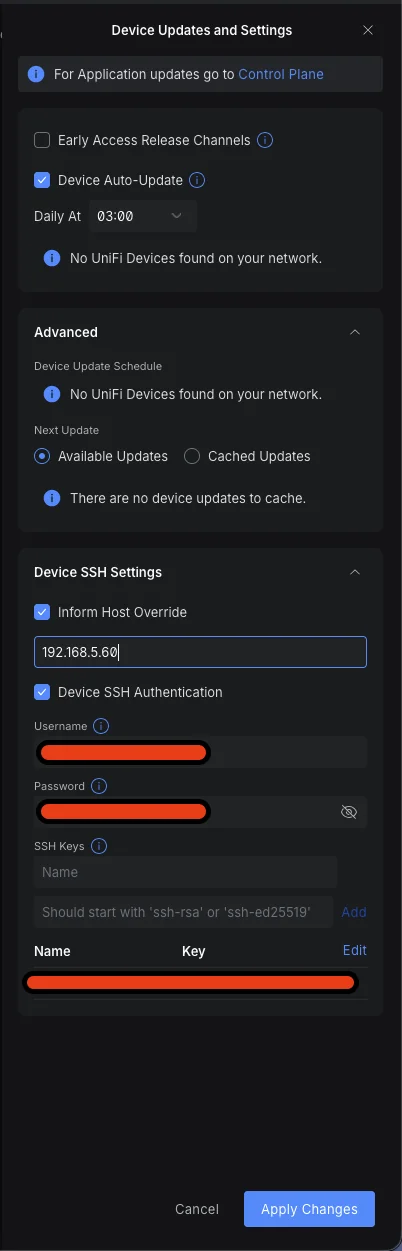
| UniFi Devices, Device Updates and Settings, section Device SSH Settings | Inform Host Override: on, 192.168.5.60. The server runs in a container, and without this it may tell the access point an address only the container knows. Device SSH Authentication: on, with a user name, a password and your public key. |
| System | NTP: manual, 192.168.2.1 |
| Networks | TRUSTED (VLAN 10), IOT (VLAN 20), GUEST (VLAN 30), each as a third-party gateway network with no DHCP: the firewall does both. |
| WiFi | One SSID per network. IoT: WPA2, 2.4 GHz only, client isolation. Guest: client isolation. |
| The access point | Mesh parent and mesh connect off. |

3. Adopt the access point#
An access point that belonged to another controller needs a factory reset first: hold its reset button for about ten seconds. Connect it to igc2. It gets its fixed address, 192.168.2.2, from the firewall. The controller is on another network, so tell the access point where it is:
ssh-keygen -R 192.168.2.2                            # the reset gave it a new host key
ssh -o PubkeyAuthentication=no ubnt@192.168.2.2      # the password is ubnt
set-inform http://192.168.5.60:8080/inform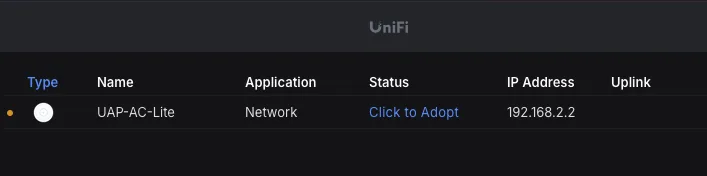
Within a minute it appears under UniFi Devices with the status Click to Adopt. Click it; after a few minutes, possibly with a firmware update and a restart, the status is Online. pf already lets the access point reach the controller on the three ports it needs, and nothing else.
Check
A phone on each SSID gets an address in its network: 192.168.10.x, .20.x or .30.x. On the firewall, grep allow_ap_unifi /var/log/pf.log shows the access point talking to its controller.