The boards: flash and configure
Six Raspberry Pi CM5 boards with the same base, configured by Ansible.
Why Provisioning, on the tour
On this page 9 sections
Five of the six boards become the Kubernetes cluster; the sixth runs the Wi-Fi controller. They all start the same way: Raspberry Pi OS Lite, a fixed address from the firewall, and one Ansible run that turns them into what they need to be.
What you need#
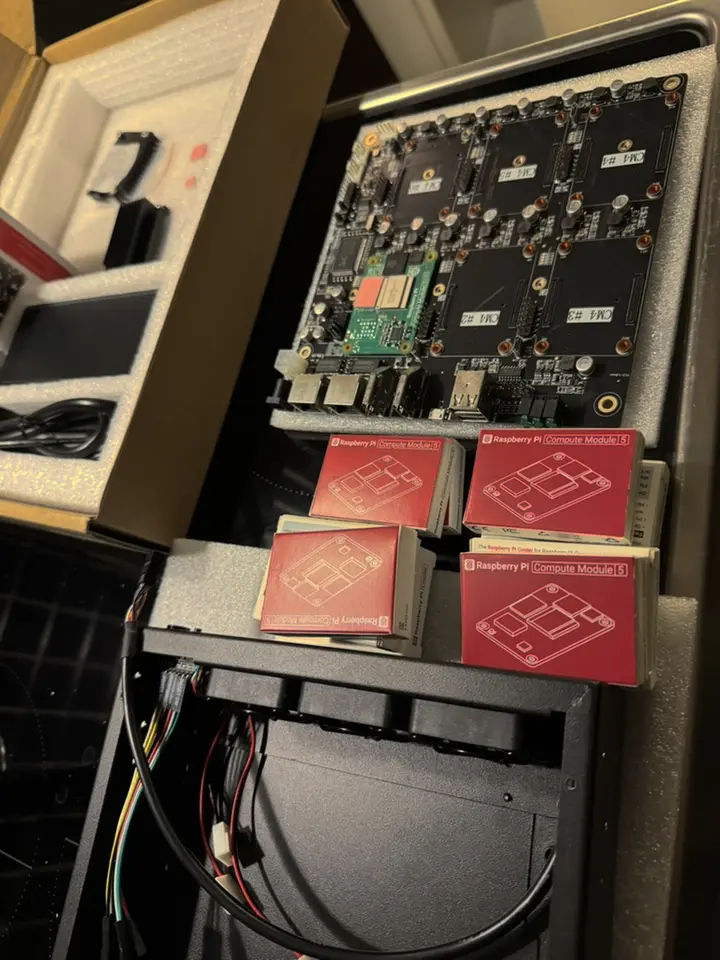
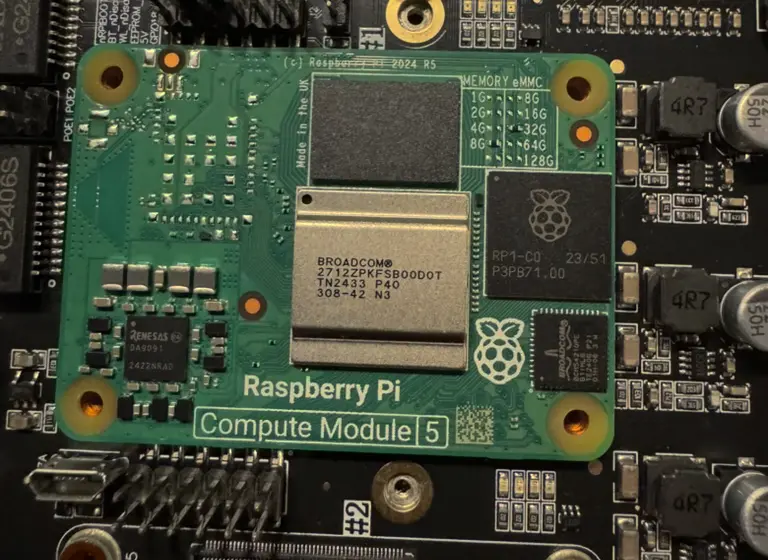
- A DeskPi Super6c with six Raspberry Pi CM5 boards (8 GB memory, 32 GB eMMC here). Its built-in switch has two Ethernet ports: one goes to the firewall's
igc5, the other is free for other devices. - An NVMe drive on one worker's slot, for the SIEM's data. Here it is
k8s-worker2. - The admin laptop, with the tools below. The commands are for macOS with Homebrew; on Linux, install the same tools with your package manager.
| Board | Address | Role |
|---|---|---|
k8s-cp1, k8s-cp2, k8s-cp3 | 192.168.5.10, .20, .30 | control planes |
k8s-worker1, k8s-worker2 | 192.168.5.40, .50 | workers; worker2 has the NVMe |
unifi | 192.168.5.60 | UniFi OS Server, for the access point |
1. Tools on the laptop#
# Everything the admin laptop needs, in one file: brew bundle --file Brewfile
# Basics
brew "git"
brew "gh"
# Kubernetes
brew "kubernetes-cli"
brew "helm"
tap "fluxcd/tap"
brew "fluxcd/tap/flux"
brew "kubectx"
brew "k9s"
# Automation and secrets
brew "ansible"
brew "sops"
brew "age"
# Utilities
brew "jq"
brew "yq"
brew "openssl@3"brew bundle --file ~/Brewfile
gh auth login # GitHub, for the repository and Flux
ls ~/.ssh/id_ed25519.pub || ssh-keygen -t ed25519 # a key for the boards, if you have none2. Flash each board#
The CM5 boards boot from their own eMMC, which is written from the laptop over USB, one board at a time. rpiboot starts a small helper on the board that makes its eMMC appear on the laptop as an ordinary disk. Build it once:
brew install libusb pkg-config
cd ~ && git clone --depth 1 https://github.com/raspberrypi/usbboot && cd usbboot && make
Use this fresh build, from its own folder. An older rpiboot installed elsewhere may send a helper too old for the CM5, and then no disk appears.
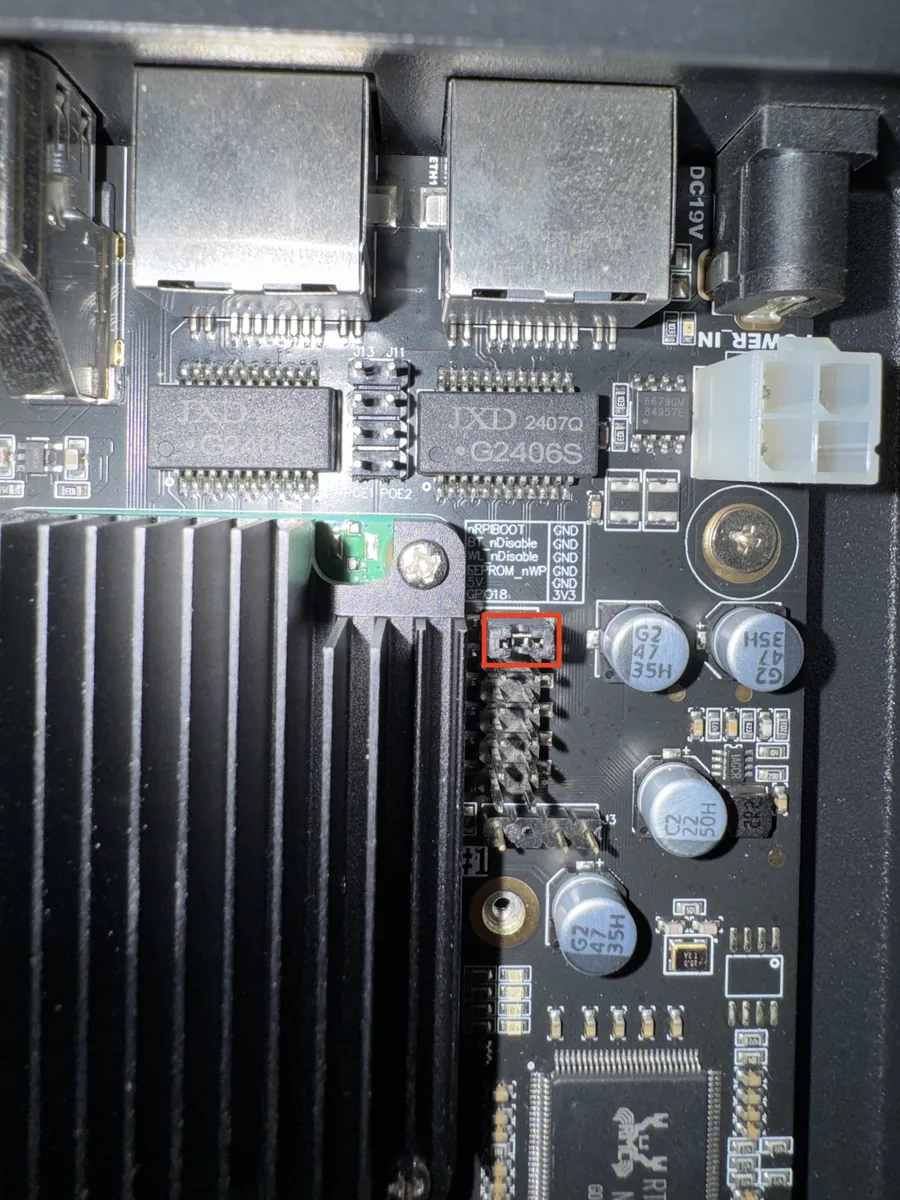
nRPIBOOT to GND.Then, for each board:
- With the Super6c off, fit the nRPIBOOT jumper for the board's slot, and connect the USB port to the laptop with a cable that carries data, not only power, directly, without a hub.
- Start
rpiboot, then power the Super6c on:
cd ~/usbboot && sudo ./rpiboot -d mass-storage-gadget64Check
diskutil list externalrpiboot ends with Second stage boot server done, and within a minute a disk of about 31 GB appears. If macOS offers to initialize it, choose Ignore. If rpiboot keeps saying Waiting for BCM…, the laptop does not see the board: try another cable first.
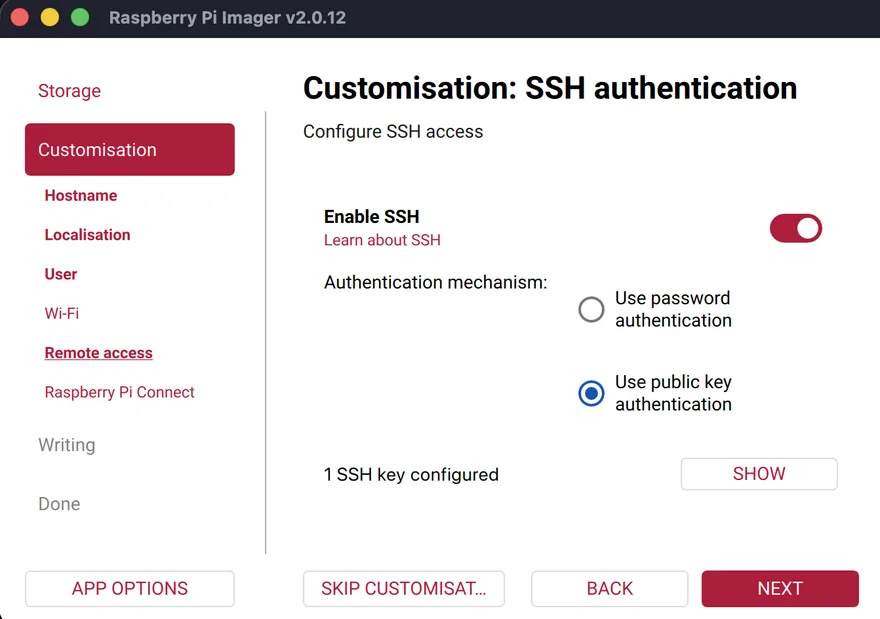
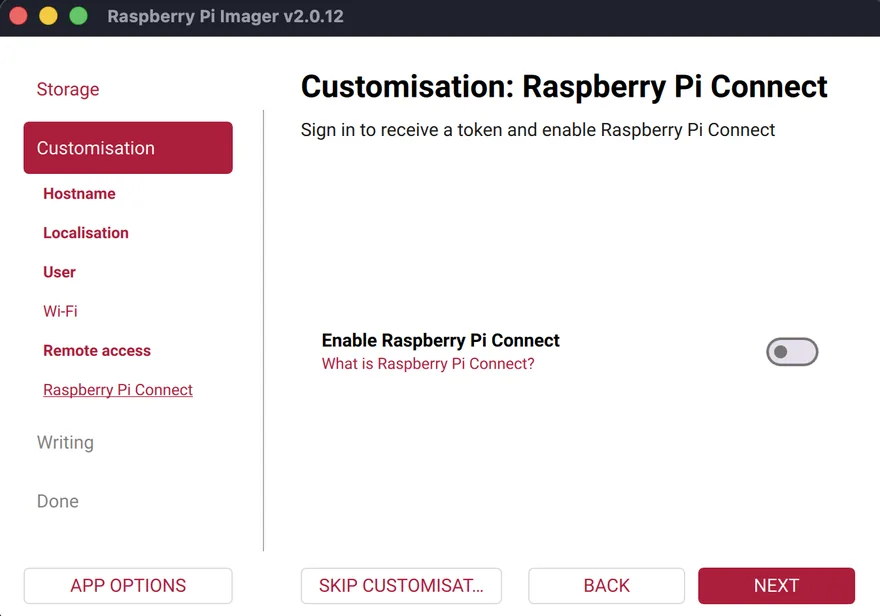
In Raspberry Pi Imager, choose the device Raspberry Pi 5 (the CM5 uses the same image), Raspberry Pi OS Lite (64-bit), the eMMC as the disk, and edit the settings before writing:
| Setting | Value |
|---|---|
| Hostname | the board's name from the table, e.g. k8s-cp1 |
| User | @ADMIN_USER@, with a long random password. Keep it in your password manager: you log in with your key, but sudo asks for the password, and so does Ansible (-K). |
| SSH | on, public-key authentication only, with your ~/.ssh/id_ed25519.pub |
| Wi-Fi | none: the base role switches Wi-Fi and Bluetooth off |
| Locale | your time zone and keyboard |
On the board with the NVMe drive, Imager lists two disks: the eMMC (about 31 GB) and the NVMe drive. Choose the eMMC.
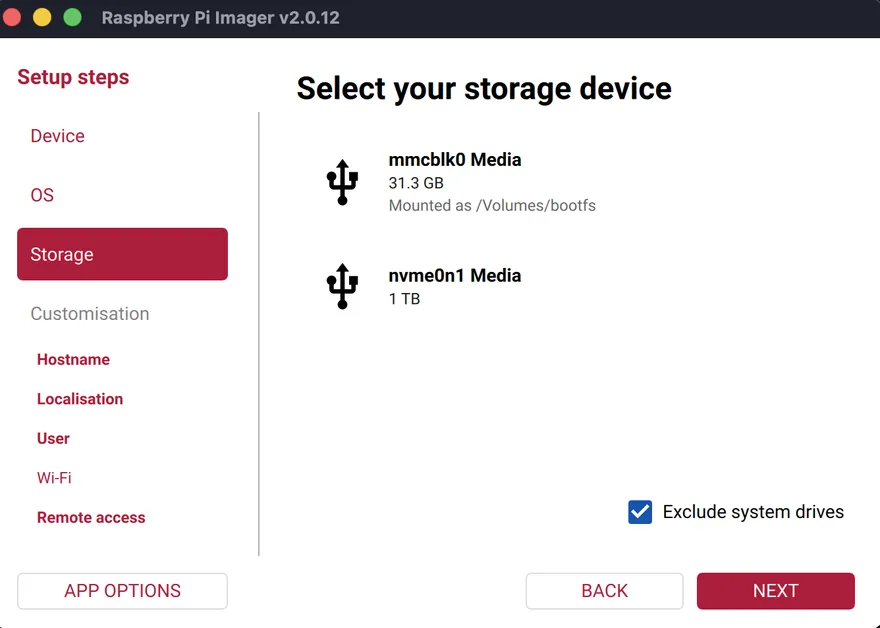
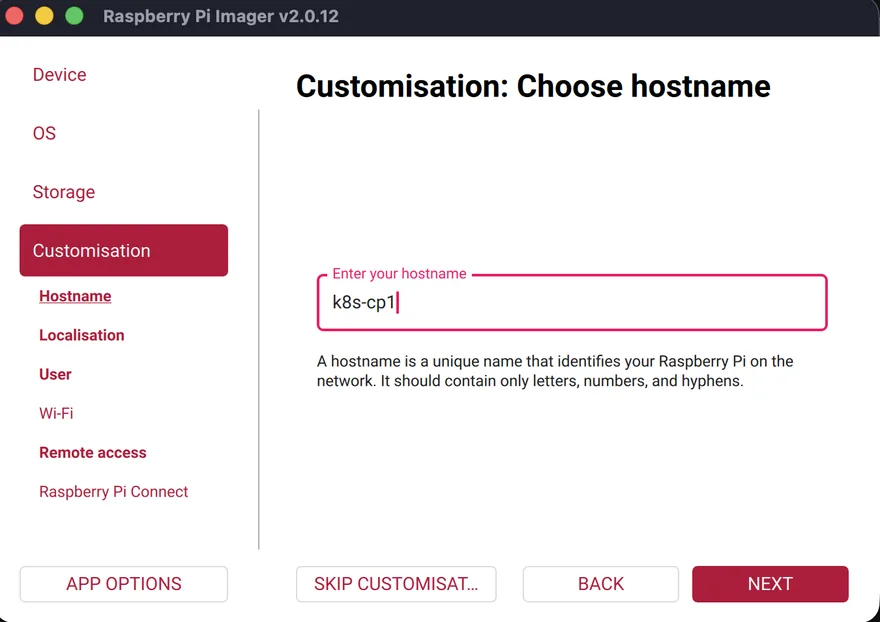
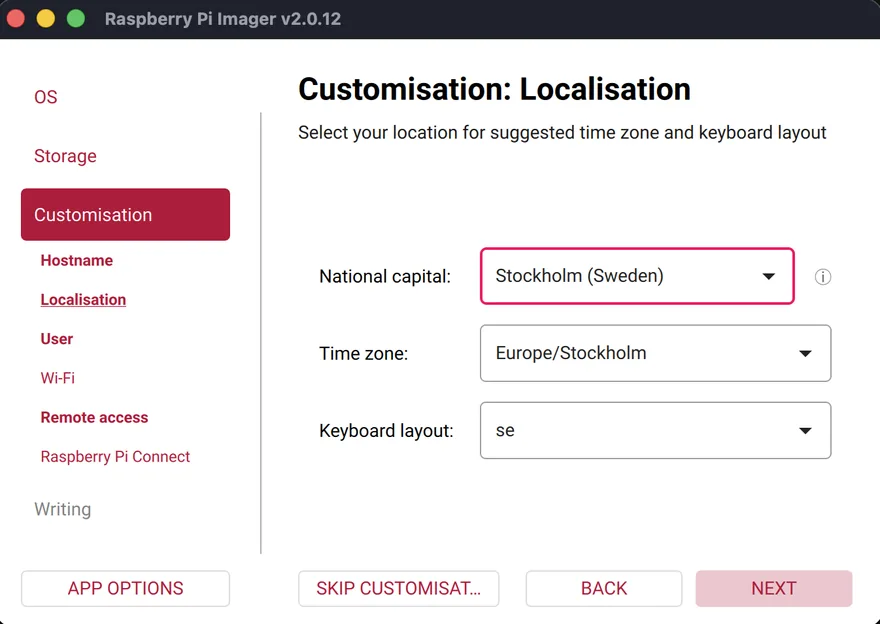
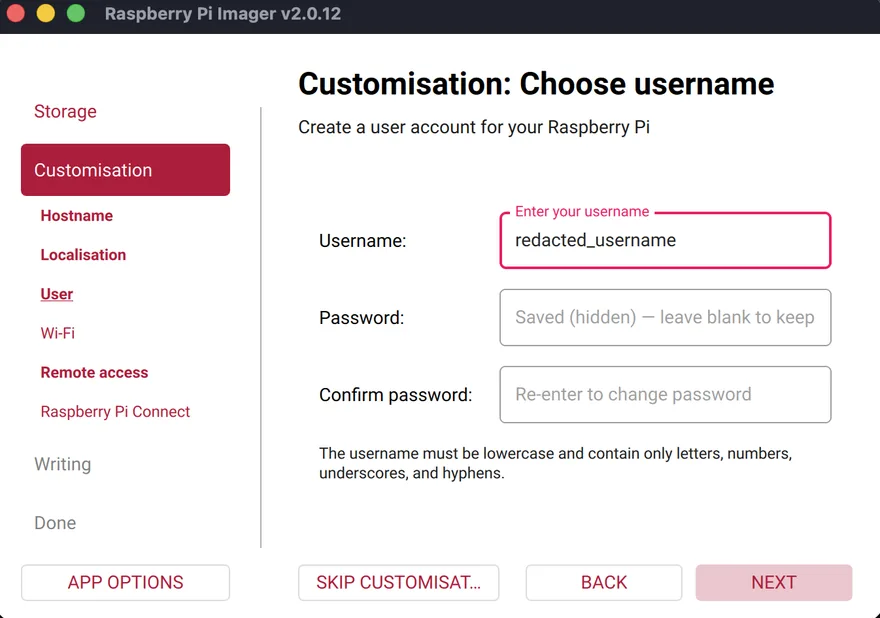
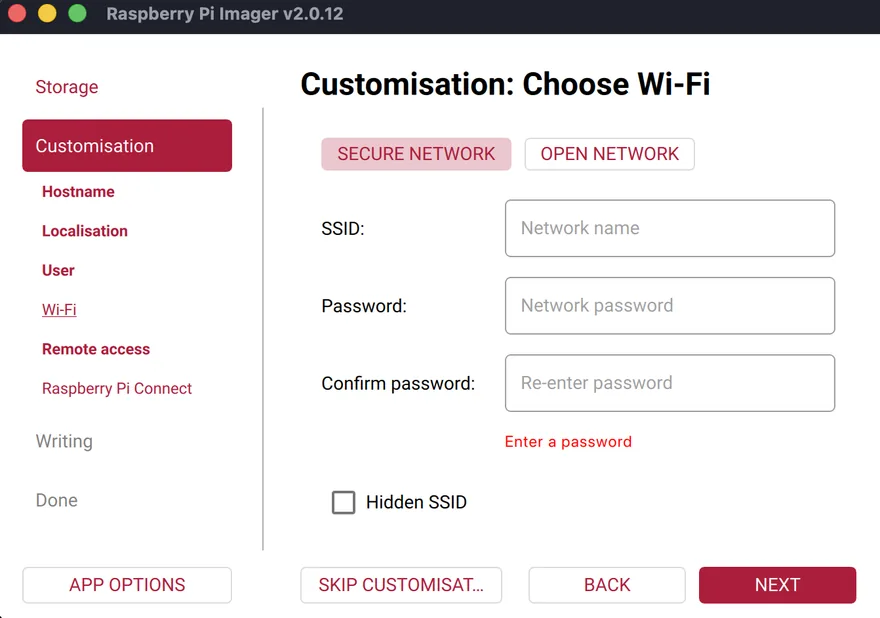
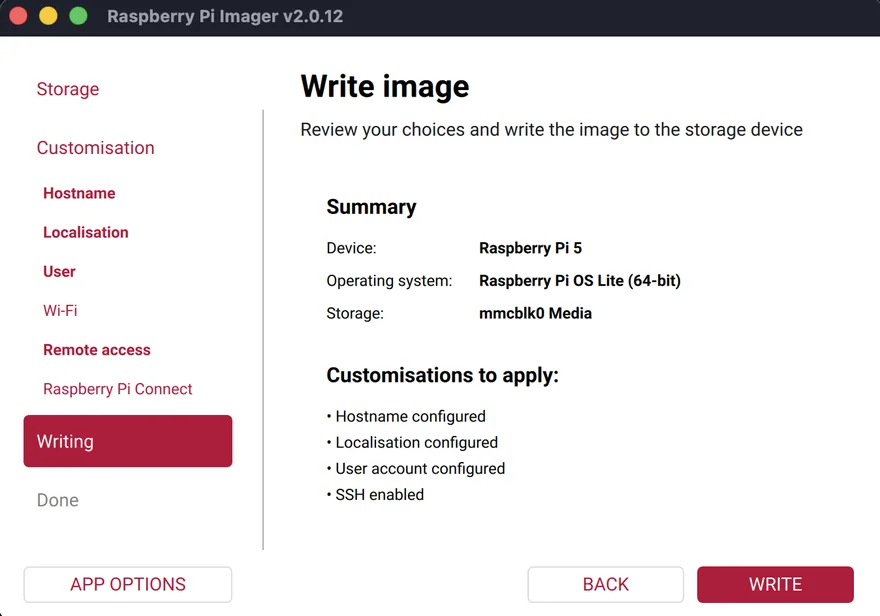
When Imager is done: power off, remove the jumper, and move on to the next board. With the jumper still on, the board starts in USB mode again instead of from its eMMC.
3. Give them fixed addresses#
The servers network has no pool for unknown devices. For the first boot, give it a temporary one, read the boards' hardware addresses from the leases, then make them fixed. (Reflashing a board does not change its hardware address: if dhcpd.conf already has the boards, they come up on their fixed addresses straight away, and this step can be skipped.)
In your copy of dhcpd.conf, add this line to the SERVERS subnet, then install it on the firewall as in chapter 4 of the Firewall guide:
range 192.168.5.150 192.168.5.199; # temporary: remove once the boards have fixed addressesPower the Super6c on, wait two minutes, and list the leases:
Check
doas grep -E '^lease|hardware ethernet|client-hostname' /var/db/dhcpd.leases | paste - - - | sort -uSix leases, each with a hostname you set in the Imager and its hardware address.
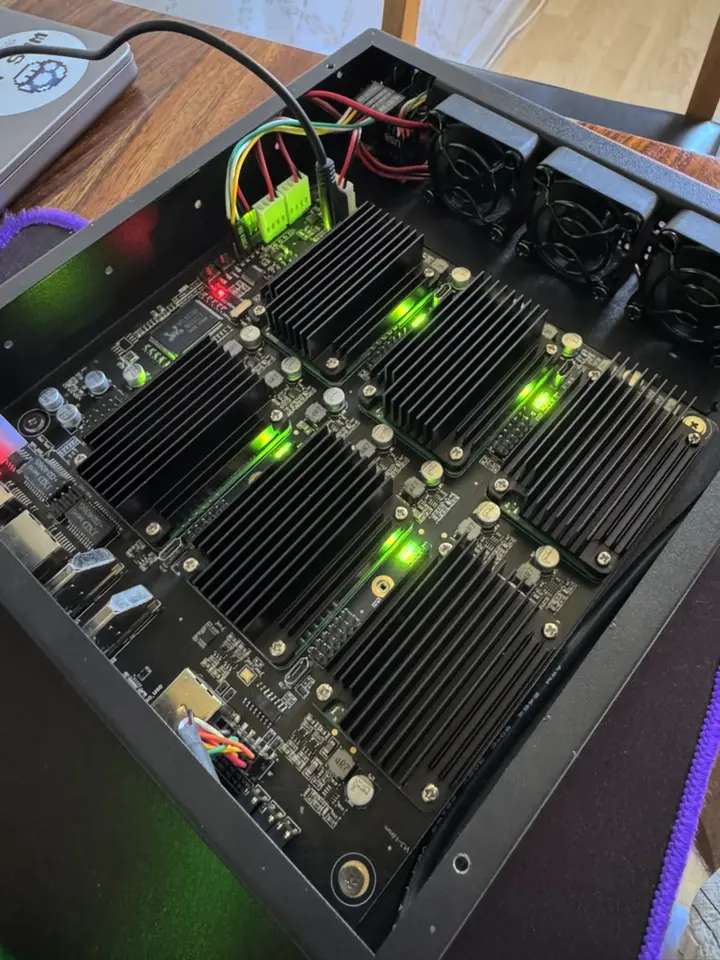
Put each address in place of its @MAC@ in dhcpd.conf, remove the temporary range line, restart dhcpd, and restart the boards: they come back on their fixed addresses, which unbound already knows by name.
4. SSH from the laptop#
cat >> ~/.ssh/config <<'EOF'
Host k8s-* unifi
  User @ADMIN_USER@
  IdentityFile ~/.ssh/id_ed25519
  AddKeysToAgent yes
EOF
for h in k8s-cp1 k8s-cp2 k8s-cp3 k8s-worker1 k8s-worker2 unifi; do ssh $h hostname; done
Check
Six hostnames, after you accept each host key once.
5. Prepare the NVMe drive#
Once, on the worker with the drive: one partition, ext4, and its UUID for Ansible. This erases the drive. First check that it is the drive you think, and that nothing has it mounted:
Check
lsblk -o NAME,SIZE,TYPE,MOUNTPOINTS /dev/nvme0n1The drive's size, and no mount point.
-F lets mkfs overwrite a file system already on the drive without stopping to ask.
sudo parted -s /dev/nvme0n1 mklabel gpt mkpart k8s-data ext4 0% 100%
sudo mkfs.ext4 -F -L k8s-data /dev/nvme0n1p1
sudo blkid -s UUID -o value /dev/nvme0n1p1nvme_uuid: @NVME_UUID@- Put the UUID from
blkidhere.
6. The Ansible project#
The repository holds everything for the boards and the cluster. Start it now, as a private repository on GitHub; Flux uses it in chapter 3.
mkdir -p ~/homelab && cd ~/homelab && git init -b main[defaults]
inventory = inventory.ini
remote_user = @ADMIN_USER@
private_key_file = ~/.ssh/id_ed25519
host_key_checking = True
interpreter_python = auto_silent
callback_result_format = yaml
[ssh_connection]
pipelining = True[control_plane]
k8s-cp1
k8s-cp2
k8s-cp3
[workers]
k8s-worker1
k8s-worker2
[k8s:children]
control_plane
workers
[unifi_host]
unifi
[nvme_storage]
k8s-worker2- Names, not addresses: unbound on the firewall resolves them.
- name: Base configuration for all nodes
  hosts: all
  become: true
  roles:
    - base
- name: Kubernetes prerequisites
  hosts: k8s
  become: true
  roles:
    - k8s_prereqs
    - k8s_packages
- name: NVMe storage
  hosts: nvme_storage
  become: true
  roles:
    - nvme_storage
- name: UniFi OS Server host
  hosts: unifi_host
  become: true
  roles:
    - unifi_host
The roles
base, on every board: all updates and automatic security updates, no Avahi or Bluetooth, the locale, SSH with keys only, time from the firewall, and Wi-Fi and Bluetooth switched off in firmware.
base_locale: en_GB.UTF-8Show the whole file, 88 lines
- name: Upgrade all packages
  ansible.builtin.apt:
    update_cache: true
    cache_valid_time: 3600
    upgrade: dist
- name: Install base packages
  ansible.builtin.apt:
    name:
      - unattended-upgrades
      - locales
    state: present
- name: Remove services we don't need
  ansible.builtin.apt:
    name:
      - avahi-daemon
      - bluez
    state: absent
    purge: true
- name: Turn on automatic security updates
  ansible.builtin.copy:
    dest: /etc/apt/apt.conf.d/20auto-upgrades
    content: |
      APT::Periodic::Update-Package-Lists "1";
      APT::Periodic::Unattended-Upgrade "1";
    mode: "0644"
- name: Generate the system locale
  ansible.builtin.lineinfile:
    path: /etc/locale.gen
    regexp: "^#?\\s*{{ base_locale }} UTF-8"
    line: "{{ base_locale }} UTF-8"
  notify: Regenerate locales
- name: Set the system locale
  ansible.builtin.copy:
    dest: /etc/locale.conf
    content: "LANG={{ base_locale }}\n"
    mode: "0644"
- name: Stop accepting locale variables from SSH clients
  ansible.builtin.lineinfile:
    path: /etc/ssh/sshd_config
    regexp: '^AcceptEnv'
    state: absent
  notify: Restart ssh
- name: SSH hardening
  ansible.builtin.copy:
    dest: /etc/ssh/sshd_config.d/10-hardening.conf
    content: |
      PermitRootLogin no
      AllowUsers @ADMIN_USER@
      AuthenticationMethods publickey
      PasswordAuthentication no
      KbdInteractiveAuthentication no
      X11Forwarding no
      MaxAuthTries 3
      LoginGraceTime 30
    mode: "0644"
  notify: Restart ssh
- name: Create the timesyncd drop-in directory
  ansible.builtin.file:
    path: /etc/systemd/timesyncd.conf.d
    state: directory
    mode: "0755"
- name: Take time from the firewall
  ansible.builtin.copy:
    dest: /etc/systemd/timesyncd.conf.d/firewall.conf
    content: |
      [Time]
      NTP=192.168.5.1
    mode: "0644"
  notify: Restart timesyncd
- name: Disable Wi-Fi and Bluetooth in firmware
  ansible.builtin.blockinfile:
    path: /boot/firmware/config.txt
    marker: "# {mark} ANSIBLE base role"
    block: |
      [all]
      dtoverlay=disable-wifi
      dtoverlay=disable-bt
notify: Reboot- name: Regenerate locales
ansible.builtin.command: locale-gen
- name: Check the SSH configuration
ansible.builtin.command: sshd -t
listen: Restart ssh
- name: Restart the SSH service
ansible.builtin.service:
name: ssh
state: restarted
listen: Restart ssh
- name: Restart timesyncd
ansible.builtin.service:
name: systemd-timesyncd
state: restarted
- name: Reboot
ansible.builtin.reboot:
reboot_timeout: 600k8s_prereqs, on the cluster's five: no swap, memory cgroups on, the kernel modules and settings Kubernetes networking needs, and the kernel headers, which Falco builds its driver against in chapter 8.
Show the whole file, 45 lines
- name: Remove swap and zram packages
  ansible.builtin.apt:
    name:
      - dphys-swapfile
      - rpi-swap
      - systemd-zram-generator
    state: absent
    purge: true
  notify: Reboot
- name: Turn off any active swap now
  ansible.builtin.command: swapoff -a
  when: ansible_facts['swaptotal_mb'] > 0
- name: Enable memory cgroups on the kernel command line
  ansible.builtin.lineinfile:
    path: /boot/firmware/cmdline.txt
    backrefs: true
    regexp: '^((?!.*cgroup_enable=memory).*)$'
    line: '\1 cgroup_enable=memory cgroup_memory=1'
  notify: Reboot
- name: Load kernel modules at boot
  ansible.builtin.copy:
    dest: /etc/modules-load.d/kubernetes.conf
    content: |
      overlay
      br_netfilter
    mode: "0644"
  notify: Reboot
- name: Kernel settings for Kubernetes networking
  ansible.builtin.copy:
    dest: /etc/sysctl.d/99-kubernetes.conf
    content: |
      net.bridge.bridge-nf-call-iptables = 1
      net.bridge.bridge-nf-call-ip6tables = 1
      net.ipv4.ip_forward = 1
    mode: "0644"
  notify: Reboot
- name: Install kernel headers meta-package (Falco builds its kmod driver against them)
  ansible.builtin.apt:
    name: linux-headers-rpi-2712
state: present- name: Reboot
ansible.builtin.reboot:
reboot_timeout: 600k8s_packages: containerd with systemd cgroups, and kubeadm, kubelet and kubectl from the Kubernetes repository, held at their version.
k8s_minor_version: "1.37"Show the whole file, 70 lines
- name: Install containerd
  ansible.builtin.apt:
    name: containerd
    state: present
    update_cache: true
- name: Read containerd's default configuration
  ansible.builtin.command: containerd config default
  register: containerd_default
  changed_when: false
  check_mode: false
  failed_when: containerd_default.rc != 0 and not ansible_check_mode
- name: Write containerd configuration with systemd cgroups
  ansible.builtin.copy:
    dest: /etc/containerd/config.toml
    content: "{{ containerd_default.stdout | replace('SystemdCgroup = false', 'SystemdCgroup = true') }}\n"
    mode: "0644"
  when: containerd_default.stdout | length > 0
  notify: Restart containerd
- name: Point crictl at containerd
  ansible.builtin.copy:
    dest: /etc/crictl.yaml
    content: |
      runtime-endpoint: unix:///run/containerd/containerd.sock
      image-endpoint: unix:///run/containerd/containerd.sock
    mode: "0644"
- name: Create the apt keyrings directory
  ansible.builtin.file:
    path: /etc/apt/keyrings
    state: directory
    mode: "0755"
- name: Add the Kubernetes signing key
  ansible.builtin.get_url:
    url: "https://pkgs.k8s.io/core:/stable:/v{{ k8s_minor_version }}/deb/Release.key"
    dest: /etc/apt/keyrings/kubernetes.asc
    mode: "0644"
- name: Add the Kubernetes package repository
  ansible.builtin.copy:
    dest: /etc/apt/sources.list.d/kubernetes.list
    content: "deb [signed-by=/etc/apt/keyrings/kubernetes.asc] https://pkgs.k8s.io/core:/stable:/v{{ k8s_minor_version }}/deb/ /\n"
    mode: "0644"
- name: Install kubeadm, kubelet and kubectl
  ansible.builtin.apt:
    name:
      - kubeadm
      - kubelet
      - kubectl
      - cri-tools
    state: present
    update_cache: true
- name: Hold the Kubernetes packages at their version
  ansible.builtin.dpkg_selections:
    name: "{{ item }}"
    selection: hold
  loop:
    - kubeadm
    - kubelet
    - kubectl
- name: Enable the kubelet
  ansible.builtin.service:
    name: kubelet
enabled: true- name: Restart containerd
ansible.builtin.service:
name: containerd
state: restartednvme_storage, on the worker with the drive: mounted by UUID, a directory for OpenSearch, and the kernel setting OpenSearch needs.
nvme_mount_path: /mnt/k8s-data
nvme_dirs:
  - name: opensearch
    owner: "1000"
    group: "1000"
mode: "2770" # kubelet applies fsGroup 1000 (group rw, setgid) on every OpenSearch start- name: Mount the NVMe by its UUID
ansible.posix.mount:
path: "{{ nvme_mount_path }}"
src: "UUID={{ nvme_uuid }}"
fstype: ext4
opts: defaults,noatime,nofail
state: mounted
- name: Create the data directories
ansible.builtin.file:
path: "{{ nvme_mount_path }}/{{ item.name }}"
state: directory
owner: "{{ item.owner }}"
group: "{{ item.group }}"
mode: "{{ item.mode }}"
loop: "{{ nvme_dirs }}"
- name: Kernel setting OpenSearch needs
ansible.builtin.copy:
dest: /etc/sysctl.d/99-opensearch.conf
content: "vm.max_map_count = 262144\n"
mode: "0644"
notify: Apply sysctl settings- name: Apply sysctl settings
ansible.builtin.command: sysctl --systemunifi_host, on the sixth board: Podman, which UniFi OS Server runs on, and your user in its group once it exists. Until chapter 1 of the Access point guide installs the server, that last task shows as skipping: that is expected.
- name: Install Podman for UniFi OS Server
  ansible.builtin.apt:
    name:
      - podman
    state: present
    update_cache: true
- name: Check whether UniFi OS Server has created its group
  ansible.builtin.getent:
    database: group
    key: uosserver
    fail_key: false
- name: Let the admin user run uosserver commands
  ansible.builtin.user:
    name: @ADMIN_USER@
    groups: uosserver
    append: true
  when: ansible_facts['getent_group']['uosserver'] is not none
7. Run it#
ansible-galaxy collection install ansible.posix
cd ~/homelab/ansible
ansible all -m ping
ansible-playbook site.yml --check --diff -K --limit k8s      # what it would change
ansible-playbook site.yml -K --limit k8s
-K asks once for the password you set in the Imager, for sudo. --limit k8s runs it on the cluster boards only; the UniFi board gets its turn in chapter 1 of the Access point guide. In the dry run, the Kubernetes packages fail with No package matching 'kubeadm': their repository is only pretend-added in check mode, just as containerd is only pretend-installed, so its configuration is skipped. That is expected; the real run does both for real. The boards reboot when the firmware and kernel settings change; Ansible waits for them.
Check
ansible k8s -b -K -m shell -a "kubeadm version -o short; systemctl is-active containerd; swapon --show | wc -l"
ssh k8s-worker2 'findmnt /mnt/k8s-data; cat /proc/sys/vm/max_map_count'
Every cluster board shows the same kubeadm version, active and 0 (no swap). On worker2, the drive is mounted and the setting is 262144.
8. Move your admin user off uid 1000#
The Imager makes your admin user uid 1000. So do many container images: OpenSearch runs as 1000 and owns its data on the NVMe drive. Sharing the number makes your login user the owner of the SIEM's data, and of its processes, on that board: anyone holding your SSH key could change or delete logs, or kill OpenSearch, without sudo. The Imager cannot set another uid, so this playbook moves the user to 2000, before anything else runs as 1000.
Show the whole file, 134 lines
# Moves the admin user off uid/gid 1000, which many container images use
# (OpenSearch among them). Sharing it would let the admin user read, change
# or delete the SIEM's data, and signal its processes, without sudo.
#
# Run it once, after the first Ansible run and BEFORE Kubernetes: usermod refuses
# while any process runs as the uid, and container processes count. The playbook
# never kills anything but the admin's own login sessions; if something else runs
# as the uid, it stops and lists it.
#
#   ansible-playbook move-admin-uid.yml -K --limit k8s-worker1    # one board first
#   ansible-playbook move-admin-uid.yml -K --limit k8s            # then the rest
#
# usermod refuses to change a user that is logged in, and Ansible logs in as
# that user. So a temporary user does the move, and is removed at the end.
# sshd allows extra AllowUsers lines to add up, so a drop-in lets it in for the move.
- name: 1. A temporary admin, with the same SSH key
  hosts: all
  become: true
  vars:
    admin_user: "{{ lookup('config', 'DEFAULT_REMOTE_USER') }}"
  tasks:
    - name: Temporary user
      ansible.builtin.user:
        name: uidmove
        shell: /bin/bash
    - name: Its .ssh folder
      ansible.builtin.file:
        path: /home/uidmove/.ssh
        state: directory
        owner: uidmove
        group: uidmove
        mode: "0700"
    - name: Its SSH key is the admin's
      ansible.builtin.copy:
        src: "/home/{{ admin_user }}/.ssh/authorized_keys"
        dest: /home/uidmove/.ssh/authorized_keys
        remote_src: true
        owner: uidmove
        group: uidmove
        mode: "0600"
    - name: Sudo without a password, for this user only, for the next few minutes
      ansible.builtin.copy:
        dest: /etc/sudoers.d/uidmove
        content: "uidmove ALL=(ALL) NOPASSWD: ALL\n"
        mode: "0440"
        validate: visudo -cf %s
    - name: Let it log in over SSH (the base role allows only the admin)
      ansible.builtin.copy:
        dest: /etc/ssh/sshd_config.d/05-uidmove.conf
        content: "AllowUsers uidmove\n"
        mode: "0644"
    - name: Check and reload sshd (open sessions stay up)
      ansible.builtin.shell: sshd -t && systemctl reload ssh
      changed_when: true
    - name: Close Ansible's kept-open connection as the admin
      ansible.builtin.meta: reset_connection
- name: 2. Move the admin user, logged in as the temporary one
  hosts: all
  become: true
  remote_user: uidmove
  vars:
    admin_user: "{{ lookup('config', 'DEFAULT_REMOTE_USER') }}"
    new_id: 2000
  tasks:
    - name: End the admin's login sessions (nothing else is killed)
      ansible.builtin.command: loginctl terminate-user {{ admin_user }}
      register: term
      changed_when: term.rc == 0
      failed_when: false
    - name: Wait until no process runs as the admin
      ansible.builtin.command: pgrep -u {{ admin_user }}
      register: left
      until: left.rc == 1
      retries: 15
      delay: 2
      changed_when: false
      failed_when: false
    - name: Stop if something other than a login still runs as the admin's uid
      ansible.builtin.shell: ps -o pid,user,args -u {{ admin_user }}
      register: who
      changed_when: false
      failed_when: true
      when: left.rc != 1
    - name: New gid
      ansible.builtin.group:
        name: "{{ admin_user }}"
        gid: "{{ new_id }}"
    - name: New uid (usermod re-owns the home folder)
      ansible.builtin.user:
        name: "{{ admin_user }}"
        uid: "{{ new_id }}"
        group: "{{ admin_user }}"
    - name: Files in the home folder still in the old group
      ansible.builtin.command: find /home/{{ admin_user }} -xdev -gid 1000 -exec chgrp -h {{ admin_user }} {} +
      changed_when: false
    - name: Close Ansible's kept-open connection as the temporary user
      ansible.builtin.meta: reset_connection
- name: 3. Back as the admin, remove the temporary user
  hosts: all
  become: true
  tasks:
    - name: No more passwordless sudo, and no SSH for the temporary user
      ansible.builtin.file:
        path: "{{ item }}"
        state: absent
      loop:
        - /etc/sudoers.d/uidmove
        - /etc/ssh/sshd_config.d/05-uidmove.conf
    - name: Check and reload sshd
      ansible.builtin.shell: sshd -t && systemctl reload ssh
      changed_when: true
    - name: Wait until no process runs as the temporary user
      ansible.builtin.command: pgrep -u uidmove
      register: left
      until: left.rc == 1
      retries: 15
      delay: 2
      changed_when: false
      failed_when: left.rc != 1
    - name: Remove the temporary user and its home
      ansible.builtin.user:
        name: uidmove
        state: absent
        remove: true
    - name: Show the result
      ansible.builtin.command: id
      become: false
      register: who
      changed_when: false
    - ansible.builtin.debug:
msg: "{{ who.stdout }}"usermodrefuses to change a user who is logged in, and Ansible logs in as that user. So a temporary user does the move, and is removed at the end.- The base role allows SSH logins for your admin user only;
AllowUserslines add up, so a drop-in lets the temporary user in for the move. - Ansible keeps its SSH connection open for a minute;
reset_connectioncloses it, so no process of the user being changed is left. - It kills nothing but login sessions. If something else runs as the uid, it stops and lists it: run it before Kubernetes.
cd ~/homelab/ansible
ansible-playbook move-admin-uid.yml -K --limit k8s-worker1     # one board first
ansible-playbook move-admin-uid.yml -K --limit k8s
Check
ansible k8s -m command -a id
ssh k8s-worker2 'ls -ldn /mnt/k8s-data/opensearch'
Every board: uid=2000 and gid=2000, still in sudo. On worker2, the folder is still owned by 1000 1000, now a number with no user behind it.
cd ~/homelab && git add ansible && git commit -m "Ansible: base, Kubernetes and storage roles"
gh repo create homelab --private --source=. --push